Table Tennis Fun Challenge
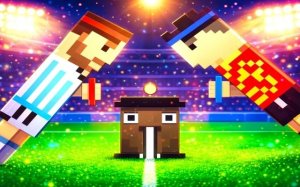
Table Tennis Local Multiplayer Pixel Art Reaction Balance Kids Sport Casual
Table Tennis Fun Challenge
34
Developer: Wish Interactive
Published: 1769097600
Updated: 2026-09-30

Reviews

Table Tennis Fun Challenge targets quick local matches rather than deep simulation. The five-point format keeps rounds short, and the automatic swing means new players can start immediately. The unpredictable character movement is the main source of difficulty, rewarding anticipation over fast reflexes. It suits siblings, friends, and families sharing a keyboard, but players looking for online play or solo modes will not find them here.

Description

Quirky Characters on the Court

Table Tennis Fun Challenge puts two unusual characters on opposite sides of a pixel-art table. Each one moves in a slightly unpredictable way, so lining up a return is never as simple as holding a direction. That wobble is the game's central twist: you are not just reacting to the ball, you are constantly compensating for how your character drifts. [IMG_1]

Return Before It Lands

The rule set is deliberately small. Move your character forward or backward with your keyboard keys, and the character swings automatically when the ball is in range. If the ball touches the ground on your side, your opponent scores. The first player to five points takes the match. There are no power-ups, no meters, and no hidden inputs to memorize, which keeps the focus on positioning and timing. [IMG_2]

Two Players, One Keyboard

This is a local head-to-head game, so both players share the same keyboard. Each person gets a set of movement keys, and matches are short enough to fit into a break or to string together into a longer session. The pixel-art presentation and kid-friendly tags point to a design aimed at siblings, friends, and families playing side by side rather than online opponents.

Reading the Ball and Your Rival

Since your character does not always move exactly where you expect, the most reliable skill is anticipation. Watch the ball's angle off the paddle and start moving early instead of waiting until it crosses the net. Watching your opponent's position matters too, because a well-placed return forces them to cover ground with the same awkward movement you are fighting. Calm, early positioning beats frantic last-second corrections.


Editorial Notes

Compatibility

✅ Works on PC & Mobile | Recommended: Chrome / Safari / Edge

Faq

Can I play Table Tennis Fun Challenge alone against the computer?
The game is described as a two-player local competition, so it is built around two people sharing one keyboard. No single-player or AI opponent mode is mentioned in the available information. If you want to play, you will need a second person on the same device.
What keyboard keys do I use in Table Tennis Fun Challenge?
Each player has a set of keys to move their character forward or backward. The specific key assignments are not listed in the game's description. The character hits the ball automatically when positioned correctly, so you only need to worry about movement, not a separate hit button.
How long does a match of Table Tennis Fun Challenge last?
A match ends when one player reaches five points. Because points are scored whenever the ball lands on a player's side, rallies can be short and matches can finish quickly. That makes the game suitable for short breaks, though you can also play several matches in a row.
Is Table Tennis Fun Challenge suitable for young children?
The game is tagged for kids and described as family-friendly, with simple controls and no special skills required to start. The quirky character movement adds a challenge, but the basic objective of returning the ball is easy to understand. It is designed for safe, lighthearted play between siblings or friends.
Why does my character move unpredictably in Table Tennis Fun Challenge?
The unpredictable movement is intentional. Both characters drift slightly rather than following a perfectly straight path, which is the game's main twist. You cannot rely on muscle memory alone; you have to adjust your positioning each time the ball comes back. This is what separates it from a standard tennis game.
Does Table Tennis Fun Challenge support online multiplayer?
No online mode is mentioned. The game is explicitly a local two-player experience, meaning both players use the same keyboard on the same device. There is no indication of network play, matchmaking, or online opponents. It is designed for face-to-face competition.